| Friendly Expert Computer Help - In Plain English | |||
 |
|||

|
|

|
|
|
|||
|
|
|
|
|
| PC911 > Reviews > Other > CoolerGuys Rounded Cables |
CoolerGuys Rounded Cables
URL: http://www.coolerguys.com/cpucool/round.shtml
E-mail this article to a friend
Rating: Excellent!
Review:
Introduction
If you've ever looked into a computer case you know that it can be quite a rat's nest of cables in there, all knotted up, tangled, hanging all over the place. But why does it matter how neat the cables are? Nobody ever looks inside, and as long as the cables are plugged in right and all the drives etc. are working, who cares, right? But there is more to it than you might think. Loose cables can get caught in cooling fans and either get torn or wreck the fan. Loose cable ends can touch the motherboard inappropriately. Loose cables can block the airflow in your case, especially those wide IDE and SCSI cables. In addition, it can make working inside the case very tedious if you have to unplug and untangle 20 cables just to add or replace a drive.
For those reasons it makes sense to pay attention to the interior of your case and clean it up as much as possible. The main items required to organize your cables are a handful of zip ties and some thinking. But in order to achieve optimal results you should consider replacing regular wide ribbon-style Floppy, IDE and SCSI cables with rounded cables.
 |
What are rounded cables?
As you can see in the picture, the main advantage of rounded cables are their slim profile. Their width is only a fraction of traditional flat cables. As a result, their impact on air flow is minimal, they are great to work with in tight spaces, and bundling them with zip ties is far easier. And as a nice added bonus, they can be purchased in a variety of colors that look a lot cooler than those traditional boring grey cables.
Rounded cables are made by arranging the wires in a bundle instead of a flat row, and covering them with a rubber insulation tube. The rubber tubing is flexible and can be bent without hurting the cable. A V-shaped rubber piece covers the parts where the wires fan out into each connector, leaving almost no wires exposed (except for the 50-pin SCSI version). These cables are available in quite a variety of types, lengths, and colors:
Type:
- IDE ATA-66/100
- 50-pin SCSI
- 68-pin SCSI U160
- Floppy
Color:
- Black
- Blue
- Red
- Yellow
Length:
- 18 inch - ATA 66/100
- 24 inch - ATA 66/100, Floppy, 50-pin SCSI
- 28 inch - 68-pin SCSI U160
- 50 inch - 68-pin SCSI U160
With this variety you can customize your case as you please no matter how big or small your case is, no matter what type of devices, and no matter what color scheme you want. Two things that should be mentioned here though: The only type that's not available is older IDE ATA 33-type cables. The ATA 66/100 cable has the blocked pin on the connector and therefore cannot be used for 40-pin ATA 33 connectors. And the 24 inch length IDE cable violates the IDE specification which sets 18 inch as the maximum allowed length.
In Action
Let's take a look at how these rounded cables work. For a good real-world example, below is a typical "before" picture.
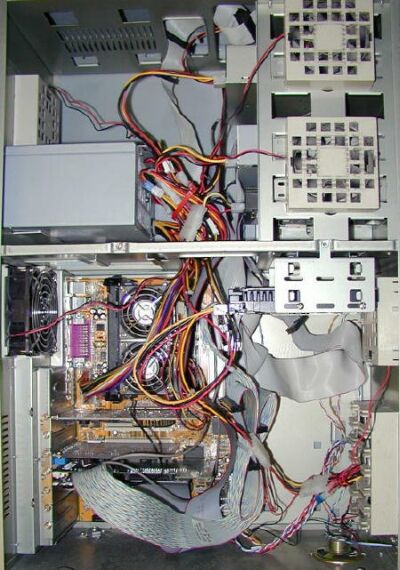 |
This was the setup of my main workstation in the Addtronics 7896A full tower case. As you can see it was pretty messy (though I've seen worse - a lot worse). Cables everywhere, SCSI and IDE cables blocking airflow, power cables close to fans, really not the best arrangement.
Let's move on to the "after" picture.
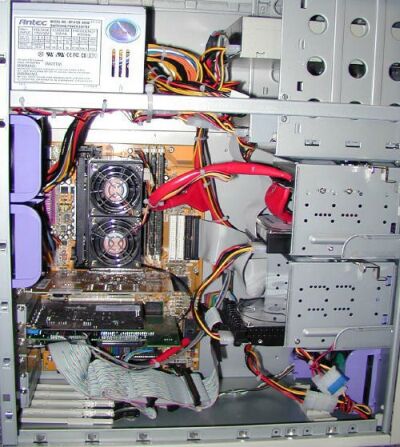 |
This is the exact same setup in the Antec SX1040 tower case, which is actually slightly less roomy than the 7896A. Now look at the difference. I admittedly went a little crazy with the zip ties to get the power cables bundled together and out of the way. But the rounded cables made it so much easier to clean up the cable mess. You barely notice the IDE, SCSI, and floppy cables anymore now that they've been replaced with rounded cables and zip-tied together.
Now compare the two pictures again: Which setup would you rather work on? Not a tough choice, is it?
Conclusion
Pros:
- Good quality
- Easy installation
- Improved airflow
- Improved cable organization
- Cool look
Cons:
- Expensive compared to regular cables
- No ATA 33 version
For pricing and availability check out the CoolerGuys web site at http://www.CoolerGuys.com. Thanx to Todd at CoolerGuys for supplying the review samples.
Submitted by: Alex "crazygerman" Byron
|
||
| Back To Top Of Page | ||
|
||
|
[PC911 Home]
[News]
[How-To's]
[Tips & Tweaks]
[Reviews]
[Freeware]
[Best Prices]
[Links] [Search] [About PC911] [Link To PC911] [Support PC911] [Legalese] ©Copyright 1998-2022 PC911 Webmaster |
||